
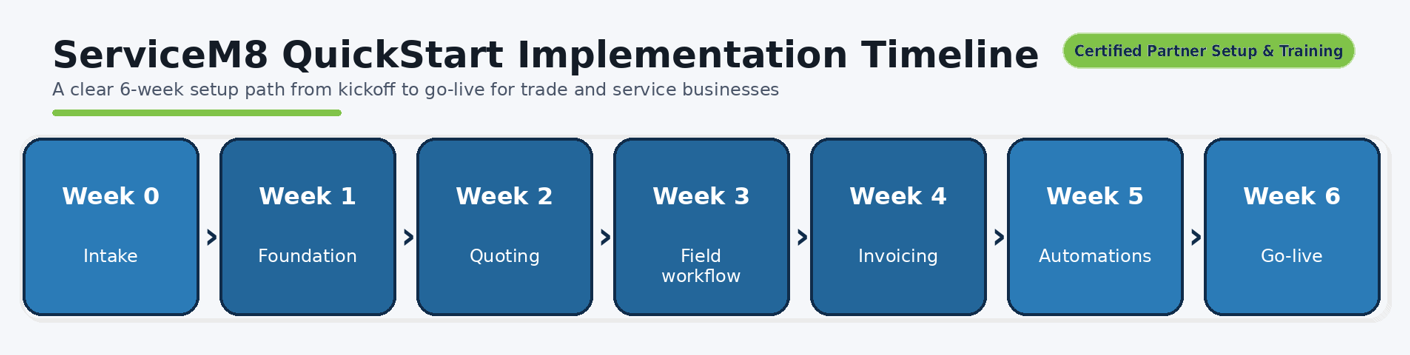
ServiceM8 QUICKSTART | Weeks 0-6 — less admin, better job management
Get ServiceM8 set up with expert training. Eligible new subscribers may receive up to $2,000 in ServiceM8 account credit. Terms apply.
After QuickStart, continue with optional Scale Pack (weeks 7–12), charged separately.
Please speak with us before subscribing so we can guide you through the rebate.
Built for trade and service businesses.
Implementation & training included.

Our Efficiency Consultants are ServiceM8 Certified Partners and highly experienced in supporting small business owners to identify the best system for their business and integrate their new system quickly, with minimal interruption and full training for the business owner. We implement quoting, scheduling, job workflow and invoicing so you actually use ServiceM8 properly.
What you’ll get in the first 30–45 days:
Faster quoting and approvals
Cleaner scheduling & dispatch
Consistent on-site checklists and photo evidence
Faster invoicing + fewer payment delays
Visibility on job profitability and staff performance
Partner QuickStart Implementation — $2,000 (inc. GST)
Designed to align with the ServiceM8 “Setup & Training Rebate” criteria.*
What’s included:
Business workflow mapping (how you quote, schedule, dispatch, bill)
ServiceM8 account setup & configuration (job categories, workflows, forms, automations basics)
Quoting & invoicing templates (pricing, line items, T&Cs, deposits)
Field workflow setup (checklists, photos, compliance notes, customer sign-off)
Payment & reconciliation setup (where applicable)
Team training (admin + techs) + go-live support
Rebate claim support checklist (what to submit + how to avoid common mistakes)
Who it’s for:
Trades & service businesses who want ServiceM8 running in under 6 weeks
Owners who want less admin + tighter job profitability
Teams who need consistent quoting and clean invoicing
How the rebate works
Speak with us before subscribing. We’ll guide you through starting your new ServiceM8 account using our Partner Link and the correct subscription method.
Purchase and complete first-time setup and training with Maximum Efficiency, a ServiceM8 Certified Partner.
Pay your setup and training invoice(s). Ensure the invoices clearly describe the setup and training provided.
Submit your rebate claim within the required timeframe, including your invoices and proof of payment. We’ll help you prepare your application.
If approved, ServiceM8 applies account credit against your subscription over time. The rebate is account credit, not a cash payment.
Common mistakes to avoid
Subscribing through the wrong channel, such as an app store or an ineligible third-party signup process.
Missing the claim deadline.
Submitting invoices that do not clearly describe setup and training.
Applying as an existing subscriber rather than an eligible new subscriber.
Eligibility and approval
The Setup & Training Rebate is offered by ServiceM8, not Maximum Efficiency. Conditions apply, including new-subscriber eligibility, subscription method, claim timing and how account credit is applied. Rebate availability and approval are at ServiceM8’s discretion. We’ll help you follow the required steps but cannot guarantee approval.
Please speak with us before subscribing so we can guide you through the rebate.
CASE STUDIES - LESS ADMIN. MORE TIME FOR WHAT MATTERS.
Maximum Efficiency helped a solar electrician replace manual compliance paperwork with digital forms completed on site, saving the owner hours each evening and freeing up time with his children.
For a solar panel maintenance sole trader, we simplified enquiry capture with a form he could text to callers, allowing customers to submit their details for follow-up when he was available.
Explore their stories below.
how to get started
Book your complimentary call. Choose a time to discuss your business and what you need from ServiceM8.
Talk through your requirements. We’ll discuss your workflow, team and setup needs.
Receive and accept your quote. We’ll send a quote outlining the recommended setup, training and costs for your approval.
Begin your QuickStart setup. Once you’ve accepted the quote, we’ll arrange your setup and training.
COMPLIMENTARY 15-MINUTE CALL
Start with a complimentary 15-minute QuickStart online call with Sandra to discuss your needs and whether QuickStart suits your business, with no obligation to proceed.
What happens once you accept your QuickStart quote?
You will receive your invoice. Please arrange immediate payment for your invoice in preparation for your first coaching session.
We will schedule in your 5 x 90-minute group Zoom sessions completed within the six-week QuickStart program.
At the start of your first session, we will send you an email invitation to your new ServiceM8 account. Please accept this immediately.
Between each session, you and your Certified Partner will complete homework to move the setup forward
We will assist you in preparing your rebate application.
Why maximum efficiency
Certified ServiceM8 Partner. Structured implementation. Real adoption across office + field.
ServiceM8 Certified Partner
Listed in ServiceM8 Partner Directory
6-Week go-live plan
Templates + automations included
ServiceM8 Partners are certified to provide consultation, setup and training, and are assessed as competent with the ServiceM8 application. Maximum Efficiency is listed in the official ServiceM8 Partner Directory and helps businesses get ServiceM8 set up properly—fast—so teams spend less time on admin and more time on paid work.
What we deliveR
Quoting → scheduling → job completion → invoicing → payments built as a single workflow (not random features)
Templates + standards so every job is completed consistently (photos, notes, checklists, sign-off)
Automations that remove chasing (quote follow-up, booking reminders, payment follow-up, feedback)
Team training + adoption so the system sticks after go-live
Targets We Work Towards
Quote turnaround: 7 days → 2 hours
Time-to-invoice: 2 days → 1 hour
Admin time per job: 6 hours → 20 mins
Quote win rate: 30% → 90%
Implementation Promise: You’ll have a working end-to-end workflow live by the end of the program (quote → job → invoice), provided client inputs and approvals are supplied on time.
faqs
“Is it cash?” → “No, it’s ServiceM8 account credit, applied over time if approved.”
“Can I do this myself?” → “Yes, but most businesses lose weeks and build it wrong.”
“Do you guarantee the rebate?” → “We guide compliance; ServiceM8 decides approval.”
Ready to do this properly?
Please speak with us before subscribing so we can guide you through the rebate.
If you want the rebate path to stay clean, start via the Partner Link first.
CASE STUDIES

Plumber, gas and hot water - Faster quotes, clearer customer choices
A rapidly expanding business needed faster quoting and simpler administration. Maximum Efficiency helped the owner send proposals with images and selectable options customers could accept online.

Solar Panel Maintenance - Easier enquiry capture, fewer interruptions on the job
Working on roofs made handling new enquiries difficult for this sole trader.
Maximum Efficiency helped him use ServiceM8 to quickly text callers an enquiry form, capturing customer details without lengthy phone conversations.
Behind this simple change was a tailored setup that brought his Lean approach into everyday business systems.

Solar and Battery Electrician — Simpler workflows for a growing team
With more technicians and apprentices joining the business, an experienced solar and battery electrician needed systems that could keep pace.
Maximum Efficiency tailored ServiceM8 to streamline processes, improve team communication and connect quoting software, helping the growing team keep work moving.

Building inspectors — Faster responses, clearer scheduling across a mobile team
A building inspection business needed to respond quickly while coordinating multiple inspectors, remote administrators and tentative bookings.
Maximum Efficiency configured ServiceM8 around its reporting workflow, helping the team manage changing schedules and keep reports moving within competitive time frames.